How to download TikTok videos without watermark and ID using TikTokio
TikTok is currently the most popular short-video social media platform, with millions of new videos uploaded and shared daily by users worldwide. With its enormous daily user base, TikTok is no longer just an entertainment app, but a vast and diverse digital content repository.
TikTokio.to is a tool that allows you to download TikTok videos without watermark, photos, slideshows, and convert TikTok videos to MP3 quickly and easily. It doesn't require you to log in or install any software; all you need to do is copy and paste the URL of the TikTok video you want to download into the input box on TikTokio. That's it!
What makes TikTokio different from other tools?
Currently, there are many tools that support downloading TikTok photos and videos without watermark, such as SnapTik, SaveTik, SSSTik, etc. However, TikTokio remains a preferred choice for users thanks to the following outstanding features:
- TikTok videos and photos, once downloaded, will not have watermark or ID. Guaranteed clean and suitable for all purposes.
- TikTokio supports downloading TikTok videos in the highest quality (HD, Full HD) without requiring you to watch additional ads like other tools.
- A robust CDN server network located globally helps to speed up download times.
- We do not collect or store users' personal information. The source code is publicly shared and can be viewed and inspected at any time.
Steps to use the TikTokio tool (detailed):
Step 1: Copy TikTok link
Step 2: Open TikTokio app
Step 3: Extracting data from TikTok
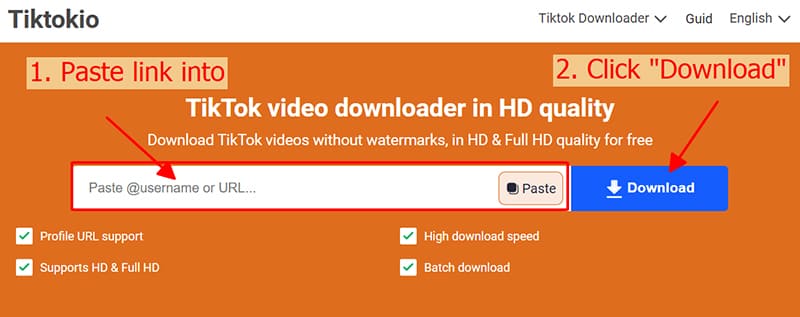
Step 4: Choose format and quality
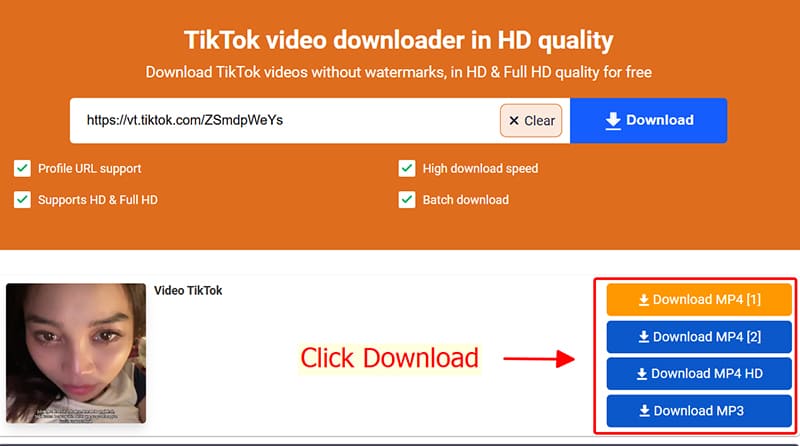
Notes on using TikTokio
- TikTokio works well on all devices and platforms such as: PC, Android, iOS, Windows, macOS, etc.
With iPhone/iPad:
- File save location: All downloaded files are located in your browser's default Downloads folder or a folder you've configured. You can check your download history if you don't see the file.
Copyright and Privacy
Please use the downloaded content only for personal purposes. Do not infringe on copyrights or violate the privacy rights of others. If you intend to reuse this content for commercial or public purposes, please ensure that you have obtained permission from the content owner to avoid copyright infringement.
TikTokio – The safest TikTok video downloader
TikTokio.to is a tool developed by a community of TikTok enthusiasts. All source code is publicly available on Github, you can view and check it at any time to ensure that the tool is safe, anonymous, and does not collect your personal data. Thank you!